


Patient matching settings control how Documenti scores inbound Clinic Membership records against your clinical patients. Configure them once for the whole organisation under Settings → Organisation.
Open Patient matching settings
- Open Settings from your account menu.
- Select the Organisation tab.
- Scroll to Patient matching.
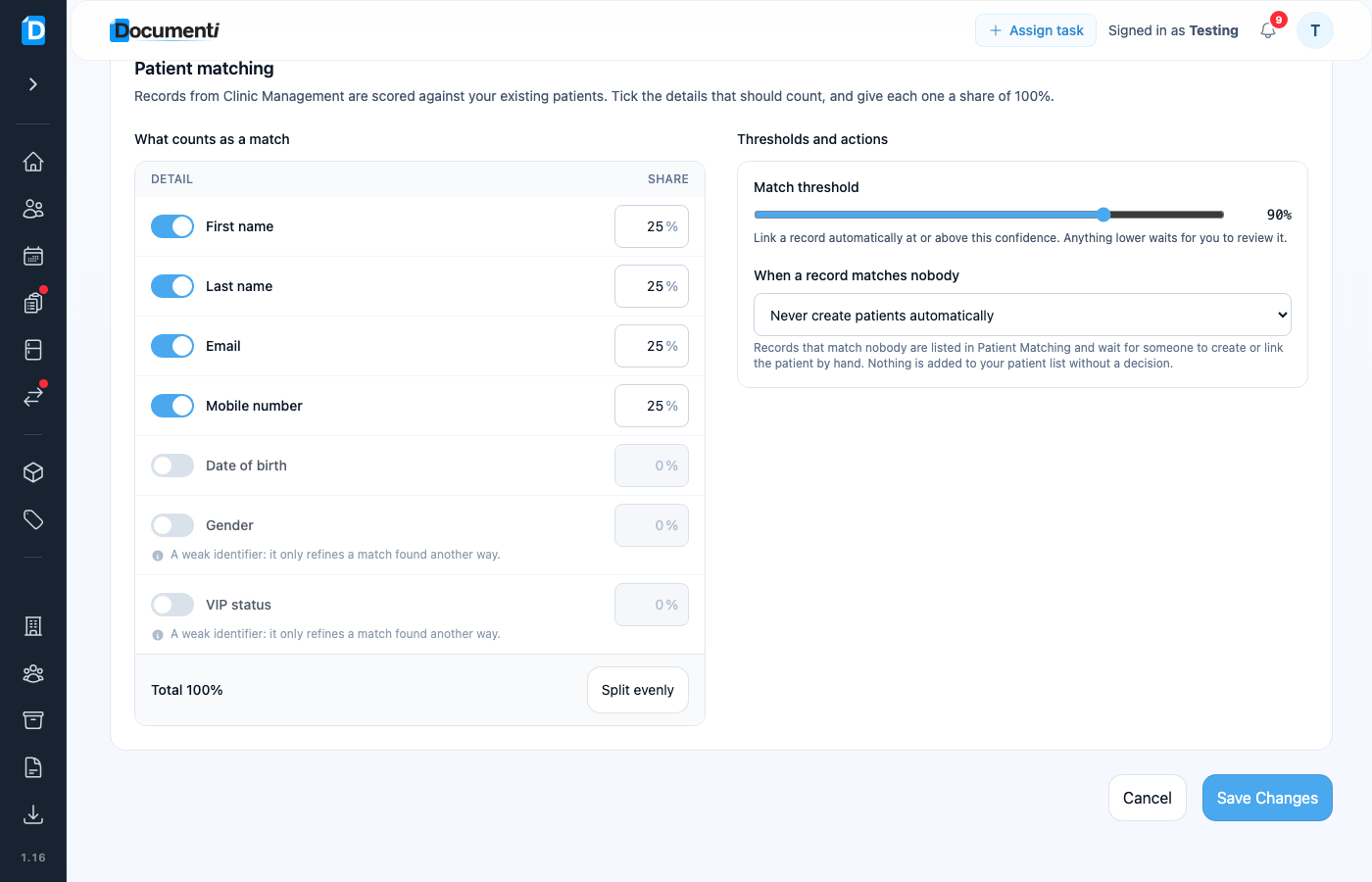
What counts as a match
- Turn details on or off: first name, last name, email, mobile number, date of birth, gender, and VIP status.
- Each enabled detail has a percentage share of the score. Shares must total 100%. Use Split evenly to reset them.
- Gender and VIP are weak identifiers: they only refine a match found another way.
Match threshold
The Match threshold slider sets the confidence a record needs before Documenti links it automatically. At or above that percentage, the records join (unless a conflict blocks the link). Anything lower waits in Patient Matching for you to review.
Note
Even with a high score, a conflicting email or date of birth blocks an automatic link. Name-only agreement never auto-links. Two closely matching patients always go to Patient Matching.
When a record matches nobody
Choose whether Documenti may create a new patient automatically, only create when the Clinic Membership record has an upcoming appointment, or never create patients automatically (everything waits in Patient Matching for a manual link or create).
