

Email marketing is for newsletters and offers, written here and sent to patients who are happy to hear from the clinic. Booking emails stay on the usual sender under Communications.
Turn it on
- Go to Settings → Growth and open Email marketing, or go to Admin → Email marketing.
- Read How it works, then What it costs: £1 per 1,000 emails sent, added to your Clinic Membership invoice. People who are skipped are not charged.
- Tick I understand email marketing is charged at £1 per 1,000 emails, then click Turn on. You can look through the page first. You can switch it off later.
Note
The first send for a clinic goes out in small batches, so it is less likely to land in spam. Each email has an unsubscribe link.
Write an email
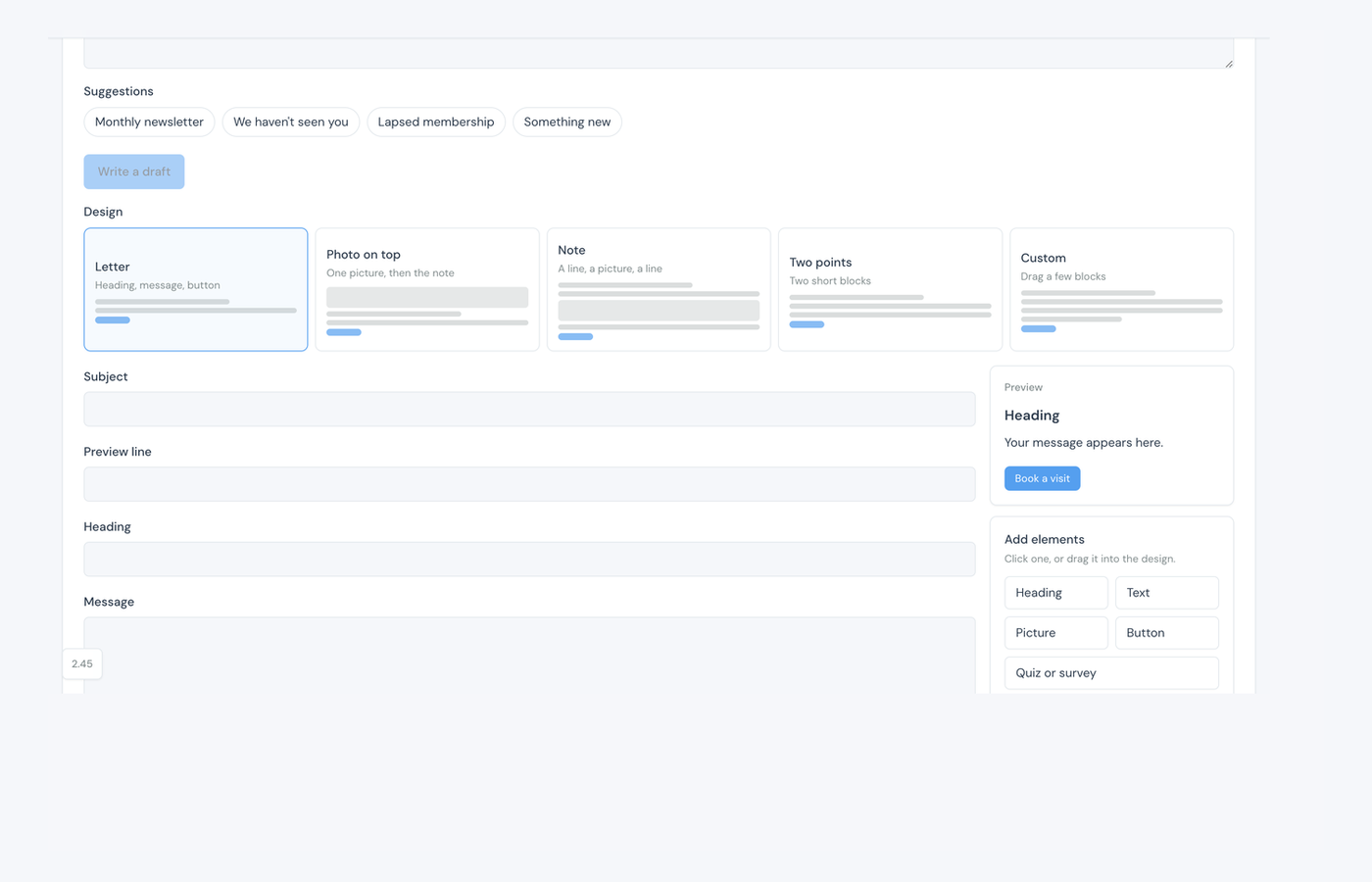
- Under Write an email, set the goal, or pick a suggestion: Monthly newsletter, We haven't seen you, Lapsed membership, or Something new.
- Click Write a draft. A draft fills in the subject, preview line, message, and button.
- Choose a design: Letter, Photo on top, Note, Two points, or Custom.
- Read the draft and edit the subject, heading, message, and button if you want.
Custom design, pictures, and a quiz
Custom lets you drag a few blocks. Click Add elements, or drag them into the design: Heading, Text, Picture, Button, or Quiz or survey. You can have up to eight blocks.
- A Quiz or survey block links to a published quiz or survey. Publish one first, then choose it here.
- Pictures sit in Storage for this clinic (50 MB). Upload one, write what the picture is of, then Save picture. That description is needed so people still know what it shows if their mail app hides pictures.
- Removing a saved picture takes it out of any email that uses it.
Choose who receives it
- Under Who should receive it, describe the people in a sentence (for example people who have not been this year), then click Find these people.
- Or pick Everyone, Active members, No membership, No recent visit, Lapsed membership, or Specific people.
- For No recent visit, set Weeks since a visit. For Specific people, search names and tick them.
- The page shows how many people can receive it. Name the group and click Save as a preset if you will use it again.
Tip
A monthly newsletter can tick Repeat this wording each month until paused. If Business settings are missing details, the page lists what to add before a send. The gear opens reply-to. Premium clinics can send from their own domain in Premium settings.
Check, then send
- Click Check this email. It needs a score of 85 or more before it can be scheduled.
- Read the notes. If it mentions a POM, confirm the wording. If some people had a marketing email in the last 7 days, skip them or include them. The first clinic send may ask you to Send in stages.
- Send now, or pick a day and send later. It goes only to people who can be emailed.
The same page lists Saved emails (drafts not scheduled yet), Scheduled emails (waiting to go out, or going out in batches, on the clinic clock), and Sent emails (what went out, and how many people received it).
On Dashboard & reports, the Email widget shows mail shots sent, clicked, booked, unsubscribed, bounced, and the charge.