

Clinic Membership lets you book two, three or four treatments as one visit, so a patient who wants more than one treatment on the same day gets a single, tidy slot in your diary. Many patients like to combine treatments when they come in. It saves them a second trip, and it gives your clinic a fuller, more planned day. The trouble starts when the diary only understands single treatments. Reception ends up stacking separate bookings back to back, guessing at timings and hoping nothing gets moved. Good multi treatment appointment clinic software removes that guesswork by treating the whole visit as one appointment made up of several parts.
This guide explains how multi-treatment appointments work in Clinic Membership, how to set one up, how your team books it on the calendar, and how patients choose their treatments when they book online.
How multi-treatment visits work in Clinic Membership
A multi-treatment appointment is a service that holds other services inside it. You create it once, decide which treatments can go into it, and then book it like any other appointment. Each one comes in one of three shapes:
- 2-in-1: two treatments in a single visit.
- 3-in-1: three treatments in a single visit.
- 4-in-1: four treatments in a single visit.
The appointment takes one slot on the calendar, with one start time and one end time. Behind the scenes it still knows exactly which treatments are inside it, so your team can see what is planned and each treatment keeps its own details.
This is different from a treatment package. A package is something a patient buys and uses up over several visits. A multi-treatment appointment is about one visit on one day, with more than one treatment in it.
Setting up a multi-treatment appointment in Clinic Membership
Setting one up takes a few minutes and lives with the rest of your services.
Add the appointment. In Settings, then Services, choose Add multi-treatment appointment. Give it a clear name your team and patients will recognise, then under Treatments per booking pick the shape: 2-in-1, 3-in-1 or 4-in-1.
Choose the allowed component services. These are the treatments that can be picked as parts of this appointment. You stay in control here. Only the services you list can be combined, so you decide which pairings make sense for your clinic and your practitioners.
There is a matching switch on each individual service called Allow in a multi-treatment appointment. Turn it on for the treatments you are happy to combine and leave it off for any you would rather keep as stand-alone visits. Together, these two settings mean a combination can only be booked if you have allowed it from both sides.
Set the duration. Then decide how long the visit should take. There are two duration modes:
- Fixed duration: the appointment always takes the same amount of time, whatever is picked inside it. This suits clinics that want a predictable block in the diary.
- Sum minus time saving: Clinic Membership adds up the length of each chosen treatment, then takes off a time saving you set. This reflects the fact that some preparation, such as the consultation chat or getting settled, only needs to happen once.
Pick whichever matches how your practitioners really work. You can review it later if the diary tells you the timings need adjusting.
On the services list, a multi-treatment appointment shows Varies for price, because the invoice uses the prices of the treatments chosen inside it. You do not need to set up every possible combination as its own service.
The full step-by-step setup is in our Help guide on setting up multi-treatment appointments.
Booking a multi-treatment visit on the Clinic Membership calendar
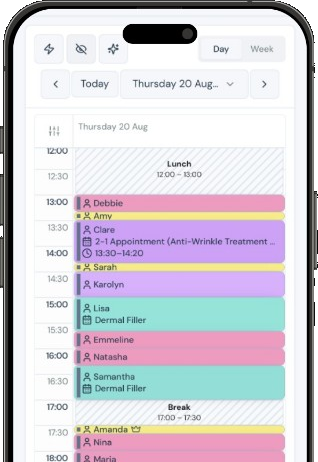
Once the appointment exists, booking it from the calendar works the way your team already books anything else. Choose the multi-treatment appointment, then use the pickers to choose each part:
- First treatment
- Second treatment
- Third treatment, for a 3-in-1 or 4-in-1
- Fourth treatment, for a 4-in-1
Each picker only offers the allowed component services, so nobody can accidentally combine something you have not approved. A later slot can be set to None if the patient only needs fewer treatments. When the treatments are chosen, the appointment drops into one slot with the right length, based on the duration mode you set.
For reception, this means one booking to make, one booking to move if the patient needs a different day, and one clear line in the diary. For practitioners, it means they can see at a glance what the visit includes before the patient arrives.
How patients book multi-treatment visits online with Clinic Membership
Multi-treatment appointments also work in your online booking. When a patient chooses one, they are asked to pick the treatments they want, choosing the right number of different treatments for that appointment. A 2-in-1 needs two distinct treatments, a 3-in-1 needs three, and so on.
Patients only see the treatments you have allowed, so the choice stays inside the rules you set. They then pick a time from the slots that fit the full visit, just as they would for a single treatment. If you are new to taking bookings online, our guide to built-in online booking covers the basics.
This takes pressure off the phone. Patients who already know what they want can book the whole visit themselves, at any time of day, without reception having to piece it together afterwards.
Aftercare for multi-treatment visits in Clinic Membership
Aftercare stays tied to each treatment, not to the bundle. If you have aftercare set up on a component service, it still applies when that service is booked as part of a multi-treatment appointment. You do not need to write new aftercare for every combination, and each patient gets the information that matches the treatments they actually had. The wider setup is in our guide to automatic aftercare emails.
Clinical decisions, including what is suitable to combine for an individual patient, stay with your practitioners. Clinic Membership is not an EMR. Clinical records live in Documenti, the EMR that works alongside Clinic Membership. That split is covered in Clinic Membership and the power of an EMR.
Tips for running multi-treatment visits in Clinic Membership
A few simple habits help multi-treatment appointments work smoothly from day one:
- Start with your most requested pairings. Set up one 2-in-1 for the combinations patients already ask for, then add more once your team is comfortable.
- Name appointments clearly. A plain name helps patients choose the right option online and helps reception find it fast.
- Check the allowed list with your practitioners. Agree which treatments they are happy to combine before you switch them on.
- Review durations after a few weeks. If visits regularly run long or finish early, adjust the fixed length or the time saving.
- Keep stand-alone options too. Some patients will still want a single treatment, and that is fine.
One visit, one slot, less juggling
Patients who want more than one treatment should not have to make more than one booking, and your team should not have to stitch the diary together by hand. Multi-treatment appointments in Clinic Membership let you decide which treatments can be combined, how long the visit takes and how patients book it, then keep the whole visit in one slot on the calendar.
Clinic Membership brings your patients, calendar, memberships and payments together in one place, so combined visits sit beside every other booking you make. Free covers up to 10 patient records. See pricing for paid plans.