

Clinic Membership can hold a treatment back from online booking around a clinician's annual leave, so the diary does the guarding for you. If you have ever wanted to block online bookings before annual leave without your clinic turning off the booking page altogether, this is the setting: you choose the treatment, you choose the days, and patients simply cannot pick that treatment with that person in the window.
Most owners know the pattern. A holiday goes in the diary weeks ahead. Then, a few days before the flight, a patient books a treatment online that you would rather not do right before you go. Or the first morning back fills with something you wanted a gentler start for. Reception spots it, rings the patient, apologises and moves things around. Nobody did anything wrong. The booking page just did not know.
An annual leave buffer fixes that at the source. It is a rule on the treatment, not a note on a sticky pad, so it works the same way every time leave is booked.
How annual leave buffers work in Clinic Membership
The buffer lives on each treatment, in that treatment's online booking rules. You turn it on for the treatments where it matters and leave the rest alone. For each one you set how many days before annual leave it should stop being bookable online, anywhere from 1 to 90 days. If you also want breathing room once the clinician is back, there is an optional setting to block a set number of days after their return as well.
From then on, Clinic Membership does the work. When annual leave is in the diary, the days around it are worked out for you and that treatment quietly drops out of online booking for the person who is away. Nobody has to remember to switch anything off before the holiday, or back on afterwards.
The full walk-through, with every setting named, is in the Help Centre guide to stopping a treatment around annual leave.
Why annual leave needs its own tick in Clinic Membership
The buffer only knows about leave that is marked as annual leave. That is deliberate. A clinic diary is full of time away for all sorts of reasons, and most of them should not trigger a buffer.
So when you book a holiday, tick it as annual leave. A reason that just says "holiday" is not enough on its own, and bank holidays, training, sickness and a normal day off do not count unless that tick is on. It keeps the rule precise: a training afternoon will not suddenly close a treatment for a week.
If your team does not mark time off in the system yet, start there. Our guide to staff time off and bank holidays covers getting leave into the diary, and the annual leave tick is part of that same step.
Who the buffer blocks in Clinic Membership, and who it does not
This is the part owners usually ask about first, because nobody wants a holiday to close the whole clinic.
- Only the person on leave. In a team, the buffer applies to the clinician who is away. Colleagues who offer the same treatment stay bookable as normal.
- Only the treatments you chose. Everything else on your menu stays open, including for the person on leave, right up to the leave itself.
- Only the location they are away from. If leave is set for one location, only that location is affected.
- Every online route for that treatment. Patients cannot book it on those days, whether they are booking fresh, rescheduling an existing visit, or booking from a membership.
In other words, the buffer is narrow on purpose. It takes one treatment, with one person, off online booking for a few days, and leaves the rest of your diary doing its job.
What happens to bookings already in the diary with Clinic Membership
A new rule does not rewrite the past. Visits that are already booked inside the window stay exactly where they are. Clinic Membership will not cancel them for you.
What it does do is flag them. When you save the leave, you get a reminder if something is already booked in that window, so you can decide what to do while there is still plenty of time. Some owners will be happy to keep the visit. Others will call the patient and offer a different date. Either way, it is your call, and you make it with the facts in front of you rather than finding out on the morning.
When reception still needs to book with Clinic Membership
The buffer stops online booking. It does not lock your own team out.
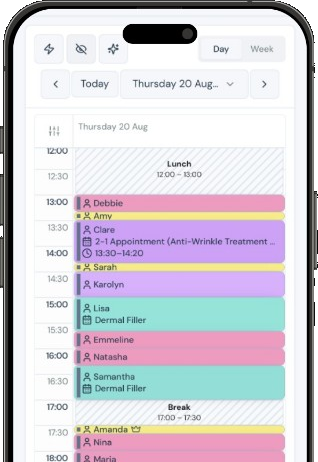
Staff can still book that treatment from the diary on a blocked day. The calendar simply asks them to confirm before it saves. That covers the sensible exceptions: a regular patient you are happy to see, a follow-up you arranged in person, or a slot you have agreed with the clinician directly. The confirm step means it is a decision, not an accident.
This is the balance most clinics want. Patients booking themselves are kept out of the window automatically, and the people who know the context can still make a judgement.
How annual leave buffers fit your rota in Clinic Membership
A buffer works best alongside a rota that already reflects who is in and when. If working hours, days off and leave are all in one place, the buffer has up-to-date information to work from, and the online booking page tells patients the truth.
If your rota still lives in a spreadsheet or a message thread, it is worth tidying that up first. Our piece on staff rota software walks through what to move across and why it makes the rest of the diary easier to trust.
Setting up your first buffer in Clinic Membership
You do not need to do every treatment at once. A good first pass looks like this:
- Pick the treatments that matter most to you around time away. Usually there are only a handful.
- Decide on a sensible number of days before leave for each one, based on how you work. There is no single right answer, and you can edit it later.
- Decide whether you want days blocked after the return, too, or whether the first day back can be business as usual.
- Check that upcoming holidays are ticked as annual leave, so the buffer has something to work with.
- Look at any reminders about visits already booked in the window, and decide on each one.
- Tell reception what you set, so they know why a treatment is missing from the booking page on certain days and when it is okay to book it from the diary.
After that, the buffer looks after itself. Each new holiday marked as annual leave gets the same treatment, without anyone setting it up again.
A calmer run-up to every holiday with Clinic Membership
Time away should feel like time away. The week before a holiday is busy enough without unpicking bookings that should never have been made, and the first day back is easier when it starts the way you planned.
With an annual leave buffer, the booking page knows what you know. Patients see what is genuinely available, reception spends less time on the phone putting things right, and your team still has the final say when an exception makes sense.
Clinic Membership brings your patients, calendar, sales and payments together in one place, with booking rules that sit on each treatment. Free covers up to 10 patient records. See pricing for paid plans.